
.png)
Description
Download AISheetsv2.0 – AI‑Powered Worksheet Generator for Students & Educators
Overview & Key Features
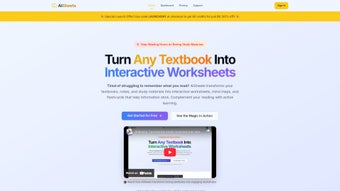
AISheetsv2.0 is a cloud‑native, AI‑driven platform that transforms static study resources—such as PDFs, textbook chapters, or scanned notes—into interactive, curriculum‑aligned worksheets. By harnessing advanced natural‑language processing and machine‑learning models, the service can automatically extract concepts, generate mind maps, produce flashcards, and design multiple‑choice or short‑answer quizzes. The application is built with full LaTeX support, guaranteeing that even the most complex mathematical equations, physics symbols, and chemical formulas are rendered perfectly, eliminating the need for manual formatting. Users enjoy a drag‑and‑drop editor that lets them rearrange sections, modify wording, embed multimedia, and set difficulty levels ranging from beginner to advanced. Once a worksheet meets the desired standards, it can be exported as a high‑resolution PDF or shared via a secure link that integrates smoothly with popular Learning Management Systems (LMS) like Moodle, Canvas, and Google Classroom. AISheetsv2.0 aims to reduce the hours teachers spend on manual worksheet creation while providing students with engaging, self‑paced study tools that boost retention and foster active learning.
- AI‑Generated Content: Automatic conversion of uploaded documents into mind maps, flashcards, quizzes, and custom exercises.
- Full LaTeX Compatibility: Precise rendering of equations, vectors, matrices, and chemical structures without extra effort.
- Customizable Difficulty: Choose Easy, Medium, Hard, or set granular parameters for each question type.
- Drag‑and‑Drop Layout Editor: Rearrange sections, adjust fonts, add images or videos, and preview changes instantly.
- One‑Click PDF Export: Generate print‑ready PDFs in A4, Letter, or custom sizes, optimized for both paper and e‑readers.
- Cross‑Platform Browser Access: Works on Windows, macOS, Linux, ChromeOS, iOS, and Android via any modern browser.
- Secure Cloud Storage: TLS 1.3 encryption in transit and AES‑256 at rest, compliant with GDPR and FERPA.
- Collaboration Mode: Real‑time co‑editing and commenting for teams of educators or study groups.
- Version History & Auto‑Save: Every edit is saved automatically, allowing you to revert to earlier versions.
- Extensive Template Library: Ready‑made templates for Mathematics, Physics, Chemistry, Biology, History, Language Arts, and more.
Installation & Usage Guide
Because AISheetsv2.0 is a fully web‑based service, there is no traditional software installation required on your local machine. Getting started is as simple as creating an account and uploading your source material. Follow the detailed steps below to launch your first AI‑enhanced worksheet:
- Create Your Account: Visit aisheetsv2.example.com and click “Sign Up.” You can register using an email address or single sign‑on options such as Google, Microsoft, or Apple. A verification email confirms your identity and activates the account.
- Select a Subscription: AISheetsv2.0 offers a free tier (up to 5 PDF exports per month) and several premium plans that provide unlimited exports, priority AI processing, and advanced customization tools. Choose the plan that matches your anticipated workload.
- Upload Your Materials: From the dashboard, click “New Worksheet.” Drag‑and‑drop PDF, DOCX, or image files into the upload zone, or import directly from Google Drive, OneDrive, Dropbox, or Box. The system supports files up to 250 MB; larger textbooks are split automatically for faster processing.
- Configure AI Generation: Once the file is uploaded, the AI engine scans the content and presents a preview panel. Select the types of output you need—mind maps, flashcards, multiple‑choice quizzes, short‑answer sections, or a combination. Adjust the difficulty sliders, set the number of questions per topic, and specify any special focus areas (e.g., “Newton’s Laws” or “Organic Chemistry Reactions”).
- Edit & Refine: The built‑in editor opens with a fully editable worksheet. Use the drag‑and‑drop interface to reorder sections, modify wording, add hints, or embed videos from YouTube or Vimeo. LaTeX equations can be typed directly using
\(...\)for inline or$$...$$for display mode. Real‑time preview shows exactly how the final PDF will appear. - Preview and Test: Click “Preview” to simulate the student experience. Test flashcards, navigate quizzes, and ensure that all interactive elements function as intended. The platform also runs a quick plagiarism and content‑quality check to flag any potential issues.
- Export or Share: When satisfied, select “Export as PDF.” Choose page size, margin settings, and whether to include a cover page. Download the file or generate a secure shareable link that can be embedded in LMS platforms via an iframe. You can also set expiration dates for links to maintain privacy.
- Maintain & Update: All worksheets are saved in “My Projects” with version history. Return at any time to edit questions, add new content, or re‑export with updated styling. Premium users receive nightly AI model updates that improve question relevance and reduce processing time.
Because everything runs in the browser, the tool automatically updates to the latest features and security patches without any user intervention. A stable internet connection (minimum 3 Mbps) is recommended for large uploads, but the interface remains responsive even on slower networks.
Compatibility, System Requirements, Pros & Cons
AISheetsv2.0 is platform‑agnostic. As a web‑application, it runs on any device that supports a modern browser, including Windows 10/11, macOS Ventura or later, popular Linux distributions (Ubuntu, Fedora, etc.), ChromeOS, iOS 14+ on iPhone/iPad, and Android 9+ on smartphones and tablets. The only technical requirement is a reliable internet connection; no additional plugins or extensions are needed.
Pros
- Zero‑Installation: Accessible from any device with a browser, eliminating the need for bulky downloads.
- AI Accuracy: State‑of‑the‑art language models generate relevant, curriculum‑aligned questions and clear explanations.
- Full LaTeX Support: Ideal for STEM subjects where precise equation rendering is essential.
- Customizable Difficulty: Teachers can tailor worksheets to varied learner levels, from remedial to advanced.
- Secure Cloud Architecture: End‑to‑end encryption safeguards student data and complies with GDPR and FERPA.
- Collaboration Tools: Real‑time co‑editing fosters teamwork among educators and enables peer review.
- Scalable Export Options: Generate single‑page handouts or comprehensive course‑pack PDFs.
- Extensive Template Library: Ready‑made templates reduce setup time across multiple subjects.
Cons
- Internet Dependency: Offline access is limited to previously cached worksheets; AI processing and PDF export require connectivity.
- Learning Curve for AI Settings: New users may need a short orientation to master difficulty sliders and template customization.
- Free Tier Limits: The gratis plan caps monthly PDF exports, which may be restrictive for heavy users.
- Processing Time for Large Files: Very large textbooks (>200 MB) can take several minutes to analyze and generate content.
- Browser Compatibility: Legacy browsers such as Internet Explorer 11 are not supported.
Overall, the advantages—especially the AI‑driven content creation, cross‑platform accessibility, and robust security—far outweigh the minor drawbacks. For most educators and self‑directed learners, AISheetsv2.0 delivers a compelling blend of efficiency and pedagogical depth.
Conclusion, Frequently Asked Questions & Call to Action
AISheetsv2.0 represents a significant step forward in educational technology, merging powerful artificial intelligence with a user‑friendly interface that works on any device. By automating the creation of mind maps, flashcards, quizzes, and fully formatted worksheets, it saves teachers countless hours of manual preparation while giving students engaging, interactive study material. The platform’s strong LaTeX support, secure cloud architecture, and collaborative features make it an ideal choice for schools, tutoring centers, and independent learners alike. Although an internet connection is required and the free plan imposes export limits, the overall value—particularly for institutions seeking to modernize their curriculum delivery—justifies the modest investment in a premium subscription.
Ready to streamline your worksheet creation process? Download AISheetsv2.0 today, start a free trial, and experience how AI can revolutionize your teaching or study workflow. For bulk licensing or campus‑wide deployments, contact our sales team for customized pricing and onboarding support.
AISheetsv2.0 delivers a seamless blend of AI creativity and educational rigor, turning PDFs into engaging learning experiences with just a few clicks.
Can I use AISheetsv2.0 on a Chromebook?
Yes. Because AISheetsv2.0 runs entirely in the browser, any modern ChromeOS device with the latest Chrome browser can access all features, including AI‑generated worksheets and LaTeX rendering.
Is there a way to work offline?
Offline access is limited to previously opened worksheets that have been cached in your browser. AI processing and PDF export, however, require an active internet connection.
How secure is my uploaded material?
All uploads are encrypted using TLS 1.3 during transfer and stored with AES‑256 encryption at rest. AISheetsv2.0 complies with GDPR and FERPA, ensuring that student data remains confidential.
Does the free plan include LaTeX support?
Yes. LaTeX rendering is available on all plans, including the free tier. The primary limitation of the free plan is the number of PDF exports per month.
Can I integrate AISheetsv2.0 worksheets into Moodle or Canvas?
Absolutely. After exporting a worksheet as a PDF or generating a shareable link, you can embed it directly into Moodle, Canvas, Google Classroom, or any LMS that supports external content.
Guides & Tutorials for AISheetsv2 0
How to install AISheetsv2 0
- Click the Preview / Download button above.
- Once redirected, accept the terms and click Install.
- Wait for the AISheetsv2 0 download to finish on your device.
How to use AISheetsv2 0
This software is primarily used for its core features described above. Open the app after installation to explore its capabilities.
User Reviews for AISheetsv2 0 0
No reviews found




